"Apple is No Longer Innovating" →

I think this DJPlayz' opinions are superficial and short-sighted. The whole reason why he argues Apple isn't innovating is because he's focused too narrowly on the iPhone.

First thing's first: how do you define "innovation"? Is innovation about ideas that are cool and exciting? Is it about shipping to market first? Is it about one-upping the competition with better specs each year? Is it about pushing the status quo forward?

I'd argue that innovation is about completely challenging the status quo.

I personally define innovation as: altering the behavior of hundreds of millions of consumers and/or disrupting the way existing companies do business.

With that definition, I'd argue Apple is innovating. A lot. They just do it quietly, either behind-the-scenes, or in such small, incremental steps that the mainstream consumer doesn't pick up on it. Here are a bunch of examples:

  • iPhone 7 Plus dual camera — Apple's first public steps into 3D mapping for Augmented Reality and self-driving cars.
  • iOS Widgets — With iOS 10, we see Apple breaking down traditional apps into small actionable widgets to not only make interactions with the phone quicker, but make more things possible on a watch. (Yes, Android came out with "widgets" first...but Android Wear has so far failed to get mainstream traction.)
  • AirPod's new W1 chip — building on bluetooth technology for longer battery life, quicker connections, improved reliability, and adding the ability to connect one accessory (e.g. AirPods) to multiple devices at the same time.
  • AirPods + Siri — laying down the groundwork for a mobile world that doesn't require smartphones. The vision is, someday, people may walk around with a smartwatch & wireless ear buds, and only pull out their smartphones when they really need a screen.
  • iOS Health app — In Steve Jobs' final years, he realized how inefficient the health industry is, especially at moving medical records between doctors and facilities. Since he passed away, Apple has hired a team of health industry experts to standardize medical data and transform the whole process.
  • Apple Watch — Apple is adding more health sensors to eventually track body vitals 24/7, which is a lot more insightful to doctors than measuring vitals that one day of the year you go in for your check-up. Apple's under-appreciated innovation here is their wide variety of stylish watch straps. When it comes to wearing stuff on the body, real people don't care about tech specs, they care about how it compliments their personal style. It's no coincidence that Android Wear has struggled with female consumers while Fitbit and Apple Watch are succeeding.
  • A-series Computer Chips — Apple's most underrated department. Because Apple has full control its own hardware, software, and silicon — in contrast to Android vendors using the same off-the-shelf parts — Apple is in much better position to pack more power into smaller devices. There's a reason why the Apple Watch is the only full-featured smartwatch competing in the 38-millimeter class.
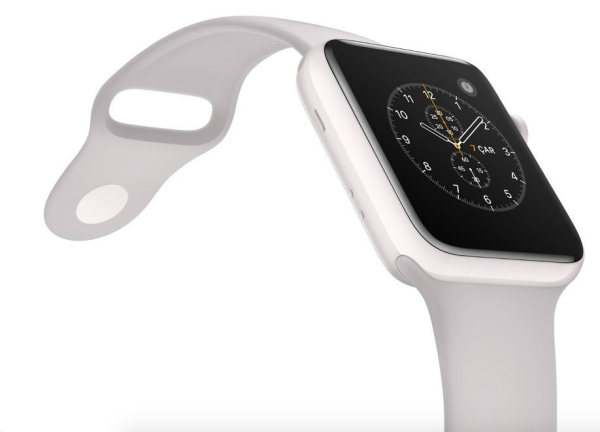
  • Apple Watch Edition in ceramic white — Smartphones these days are either made of glass or aluminum casing. Apple is heavily investing in ceramics and material science to make something lighter yet stronger than steel, more radio-friendly, and more luxurious. The new Apple Watch Edition is their first product to use ceramic, which they will use as a learning experience to possibly build hundreds of millions of ceramic-cased iPhones.
  • Gold, Rose Gold, Jet Black — Apple is pushing the consumer electronics industry to be more fashionable. Sounds superficial, but there was a time when automobiles all looked like horse carriages. At some point they became personal fashion statements and status symbols. Try picturing the target demographic for people who drive a BMW vs. Cadillac vs. Porsche vs. Prius. We're at that point where consumer electronics is a fashionable expression of how we see ourselves, and I'd argue it's Apple leading that trend.

All of these things are innovations Apple has currently in development. Augmented reality, self-driving cars, revamping the health industry, fashion-forward electronics, building a post-smartphone world…all of these are world-changing ideas that will change the way people live and disrupt the way companies do business.

But these things take time.

So when people say "Apple isn't innovating anymore," I'd argue they're simply focusing too closely on the wrong details, not seeing the big picture, and have the unrealistic expectation that world-changing revolutions happen every 12 months.

The Reinvention of the Camera →

Evan Spiegel:

People wonder why their daughter is taking 10,000 photos a day. What they don’t realize is that she isn’t preserving images. She’s talking. […]

It’s not about an accumulation of photos defining who you are. It’s about instant expression and who you are right now. Internet-connected photography is really a reinvention of the camera. And what it does is allow you to share your experience of the world while also seeing everyone else’s experience of the world, everywhere, all the time.

Even though consumers are no longer "wowed" by camera improvements on smartphones, the internet-connected camera is more important than ever.

How to Fix Home Screen Layout After Restoring iOS Backup →

Sometimes after restoring iOS from a backup, your third-party apps will appear scattered across various screens instead of the folders/screens where you originally placed them.

This tip by Dan Frakes for iOS 4 is still relevant today:

The problem here is that whenever you click the Restore button in iTunes’ Summary view for your iPhone, iPad, or iPod touch, iTunes wipes your device clean, installs a new copy of the iOS software, and then restores your media and settings from your backup. In other words, you’re forcing a first pass each time.

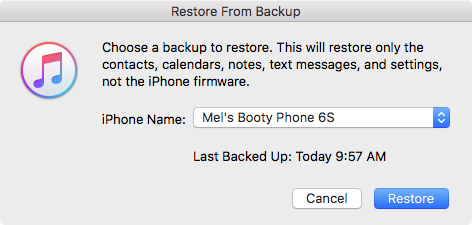
It turns out that iTunes actually offers two kinds of restores. The first is the one described above, accessed by clicking the Restore button in iTunes’ Summary view for your iOS device. The other one is less obvious—you access it by right-clicking (Control-clicking) your iOS device in iTunes’ sidebar and choosing Restore from Backup. As the dialog that appears explains, the latter procedure restores only your data and settings, not the iPhone’s firmware or OS. What the dialog doesn’t note is that your third-party apps apparently remain on the phone, as well. In other words, it gives iTunes that “second pass” at restoring your Home-screen app organization.

The trick, of course—and what I neglected to do during all those restores on Saturday—is to *let iTunes finish syncing your apps** on its first restore/sync. Then you can do the second, non-firmware restore to let iTunes tidy up.

So to break it down, here's what typically happens when you upgrade to a new iPhone:

  • connect your new iPhone/iPad to iTunes and restore from your latest backup.
  • wait for the restore process to finish and begin the standard sync process. (This is the "first pass")
  • important: wait for all third-party apps to sync with the device.

After all third-party apps have been synced and you find them scattered instead of in their proper positions:

  • click the Restore Backup button and again, restore from your latest backup. (This is the second pass)

When you Restore Backup from iTunes instead of Restore iPhone, it will clearly state:

This will restore only the contacts, calendars, notes, text messages, and settings, not the iPhone firmware.

It will also restore your home screen folders and layouts, just like before.

Lyft

The Third Transportation Revolution →

Lyft Co-Founder, John Zimmer explains his vision for the future of transportation.

He starts off reminding us what life was like before and after the second transportation revolution:

Back then, people used city streets as public spaces. Streets were where children could play. A place for shopping, where you could stop at a cart on the way home to pick up everything from dinner ingredients to shoes for your family. People spent a lot of time outside on the street, making friends, seeing neighbors, and living their lives within a true community.

But when streets began to be redesigned for more and more cars, all of these other benefits suffered. As time went on, streets became a place solely for cars. They encroached closer to homes. Yards disappeared. People were left with narrower sidewalks — or no sidewalks at all. That meant less foot traffic, which made it harder for small businesses, shops, and restaurants to flourish. Development patterns changed dramatically and the strip mall was born. And with fewer people outside, neighborhoods also became less safe because we lost the benefit of having “eyes on the street” most hours of the day. For the first time in history, cities were no longer centered on human social interaction.

All of this made it harder for a community to thrive. And as changes like this played out across the country, the face of America’s cities was transformed for generations.

The shift from car ownership to ridesharing to autonomous cars will transform transportation ino the ultimate subscription service:

This service will be more flexible than owning a car, giving you access to all the transportation you need. Don’t drive very often? Use a pay-as-you-go plan for a few cents every mile you ride. Take a road trip every weekend? Buy the unlimited mileage plan. Going out every Saturday? Get the premium package with upgraded vehicles. The point is, you won’t be stuck with one car and limited options. Through a fleet of autonomous cars, you’ll have better transportation choices than ever before with a plan that works for you.

Using the Lyft network will also save you money. Here’s why: We don’t often think about it, but owning a car and making monthly payments also means paying retail prices for every aspect of getting where you need to go — fuel, maintenance, parking, and insurance. In a future subscription model, the network will cover all of these costs across a large network of cars, passing the savings onto you. We cut the hassle and you get the one thing you really want: the true freedom to ride.

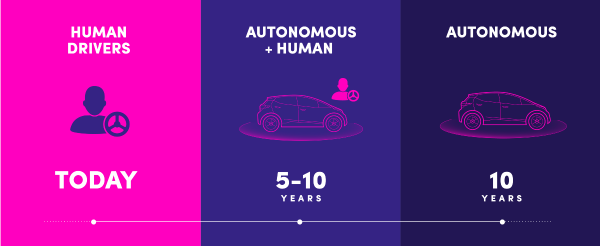
Zimmer envisions this as a ten-year process. When it happens, it will transform not only how we get around but it'll change the world around us:

Since autonomous networks will be much more efficient than individual ownership, a large number of cars will come off the road — freeing up an enormous amount of space to devote to anything but cars. Eventually, we’ll be able to turn parking lots back into parks. We’ll be able to shrink streets, expand sidewalks, and make room for more pedestrians. That means more local shops and small businesses, more shared spaces, and more vibrant communities. This translates to better cities — and better lives — for people all over the world.

How iPhone 7's Dual Cameras Work →

Matthew Panzarino:

Every time you take a picture with the iPhone 7, both the wide angle and telephoto fire off. Yes, two 12 megapixel pictures for every shot. This could be a prime driver behind the increase of the iPhone 7 Plus’ memory to 3GB.

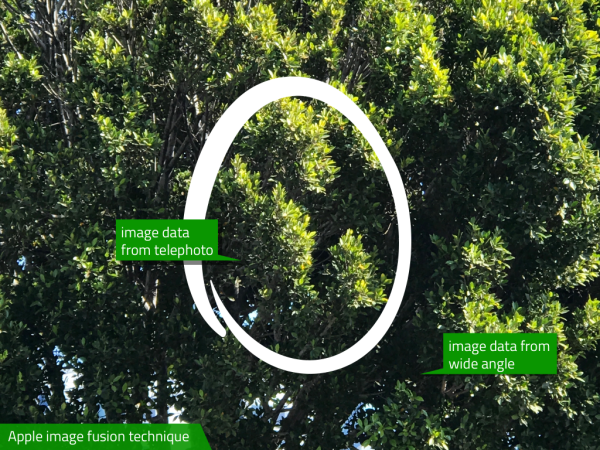
Both images are needed due to an Apple technique it is calling “fusion” internally. Fusion takes data from both sensors and merges them into the best possible picture for every condition. If, for instance, there is a low-light scene that has some dark areas, the image-processing chip could choose to pick up some image data (pixels or other stuff like luminance) from the brighter f1.8 wide angle and mix it in with the data from the f2.8 telephoto, creating a composite image on the fly without any input from the user. This fusion technique is available to every shot coming from the camera, which means that the iPhone 7 Plus is mixing and matching data every time that trigger is tapped.

This technique is made possible because the optics, coatings, sensors, perspectives and color balances of the two cameras are perfectly matched.

The fusion technique also comes in handy when using the new zoom functions of the iPhone 7 Plus.

iOS 10: The Little Things

My Favorite Details & Refinements

  • You can now delete all those useless stock apps!
  • Raise-to-wake! Simply raise up your iPhone (6S or newer) and the screen will turn on. Another one of those features that'll shave a half-second every time you pick up your phone. Really handy for playing/pausing music while driving.
  • LOVE the new keyboard sounds.
  • Super quick access to the camera! Just raise-to-wake and swipe left.
  • In the Camera app, the selfie toggle button is now conveniently located on the bottom-right (previously located on the top-right).
  • In iMessage, you can now like and add reactions ("Tapbacks") to specific messages.
  • In iMessage, invisible ink and full screen effects are so fun! Simply 3D Touch or Long Press on the Send button.
  • In iMessage, links and videos are automatically loaded with thumbnail previews. (You can add invisible ink and other effects to these too!)
  • In iMessage, you can drag stickers onto specific messages.
  • In iMessage, you can now draw on photos and screenshots. Before sending a picture, tap the thumbnail, tap Markup, doodle as much as you want, hit Save, and send.
  • In iMessage, you can enable Read Receipts for specific convos and disable them for all your side bitches.
  • In iMessage, you can turn your phone to landscape and the text field will turn into a giant sketch pad.
  • On an iMessage notification, you can now 3D Touch to peek into the entire conversation.
  • The keyboard will suggest emojis while typing.
  • If you have a Mac with macOS Sierra, iCloud Desktop actually comes in pretty handy.
  • If you activate “Hey Siri” with your voice, it will respond back to you with voice. If you activate Siri by holding the Home button, Siri will respond only on screen.
  • When you pause/play music, Album art will subtly change size.
  • If your iPhone is almost full and you try to upgrade to iOS 10, it’ll offer to temporarily delete apps, proceed with the upgrade, and then restore the apps when it's done.
  • In Apple Maps, destination suggestions will include locations previously viewed in the Yelp app.
  • Apple Maps will remember where you parked!

Observations

  • The new Raise-to-Wake and Push-Home-to-Open took a week to get used to. (To unlock without having to push the Home button: go to Settings > General > Accessibility > Home Button > Rest Finger to Open)
  • The new iMessage apps will totally overshadow the Android-style third-party keyboards.
  • The new iMessage will make you hate that one stubborn green bubble person in all your group chats.
  • If you send a Tapback or full screen effect to an iOS 9 user, they will receive plain text that says something like, "(Sent with Confetti effect)" or "Mel loved your message 'Lemme touch your butt'".
  • If you really dislike someone who has epilepsy, you can send them into a seizure by sending them the lasers full screen effect. (Full screen effects can be disabled under Settings > General > Accessibility > Reduce Motion)

Annoyances

  • The new Lock sound is gross. You can disable it under Settings > Sounds > Lock Sound.
  • Gestures for notifications & widgets get a little confusing because they look the same. Do you tap it, 3D Touch it, or swipe right on it?
  • Switching between a lot of iMessage apps feels a little clunky.
  • When you 3D Touch on an iMessage notification to peek into a conversation, it will mark the convo as read (i.e. send out Read Receipts).

Conclusion

The revamped iMessage is a HUGE part of iOS 10. And the best part of it is, everyone will use it, simply because it's there. No app installation needed. No registration required. It'll just work, even for your parents.

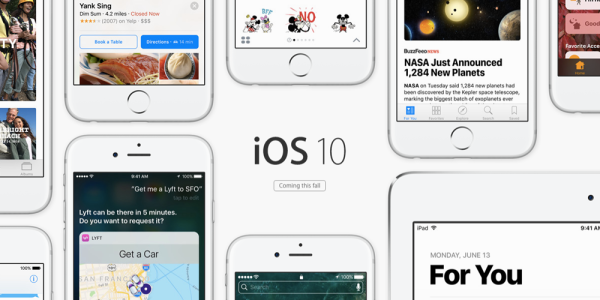
iOS 10 also hints at the future — Apple is slowly transitioning us away from the traditional idea of "apps".

Instead of constantly jumping around between apps, we will use extensions and widgets. We will slowly do more and more things from within notifications, iMessage, Siri, Apple Maps, etc.

By breaking traditional apps down into their simplest, smallest actions, not only will this make interactions quicker on the phone…

It will also make more things possible on a watch.

Apple Watch Edition Ceramic White

Theory: Apple Shifting to Super Durable, Elegant Zirconian Ceramics →

It's been rumored for a while that the 2017 iPhone will be an "all-glass" enclosure with AMOLED screen.

Apple just recently unveiled the new Apple Watch Edition in white ceramic:

Uniquely elegant. Brilliantly scratch-resistant. Sleek, light, and extremely durable, ceramic is more than four times as hard as stainless steel — with a pearly, lustrous finish that won’t scratch or tarnish.

The craftsmanship behind the case. The process of creating the Apple Watch Edition case begins with a high-strength zirconia powder that’s combined with alumina to achieve its rich, white color. Each case is then compression molded, sintered, and polished using a diamond slurry, which results in a remarkably smooth surface and an exquisite shine. With this precise level of workmanship, every Apple Watch Edition case takes days to make.

Active Quora user, Brian Roemmele, theorizes Apple has pushed Aluminum to its limits and is now looking to master Zirconian Ceramics at scale:

Why is Apple moving to Zirconia Ceramics?

  1. Strength
  2. Radio Transparency
  3. Heat Dissipation
  4. Scratch resistance
  5. Ease of manufacturing

With that said, here is his theory:

In September 2017, Apple will be releasing the 10th Anniversary iPhone 8. It is my view Apple will use this moment to present a completely new iPhone design that will be revolutionary in many ways. I assert the design language will be based on a more organic shape and design. There will be ergonomic curves that will mold into the new AMOLED display being driven by video chips that simply could not have thermally operated in such a small space [without] heat efficiency of Zirconia ceramics. The iPhone 8 will not just be water resistant but water proof and dust proof to a level never seen before on a smartphone. The lightning port will look more like the Mag-Safe system used on the MacBook Pro devices and mostly use inductive charging. Of course there will be no 3.5mm audio jack.

While critics will be too busy shouting, "Android's had AMOLED and wireless charging for years!" Apple will be putting their industry-leading customized chips into devices that are stronger, lighter, and more durable than everyone else's glass and aluminum-based devices.

Why Apple Killed the Headphone Jack →

John Paczkowski:

A tentpole feature of the new iPhones are improved camera systems that are larger than the cameras in the devices that preceded them. The iPhone 7 now has the optical image stabilization feature previously reserved for its larger Plus siblings. And the iPhone 7 Plus has two complete camera systems side by side — one with a fixed wide-angle lens, the other with a 2x zoom telephoto lens. At the top of both devices is something called the “driver ledge” — a small printed circuit board that drives the iPhone’s display and its backlight. Historically, Apple placed it there to accommodate improvements in battery capacity, where it was out of the way. But according to Riccio, the driver ledge interfered with the iPhone 7 line’s new larger camera systems, so Apple moved the ledge lower in both devices. But there, it interfered with other components, particularly the audio jack.

So the company’s engineers tried removing the jack.

In doing so, they discovered a few things. First, it was easier to install the “Taptic Engine” that drives the iPhone 7’s new pressure-sensitive home button, which, like the trackpads on Apple’s latest MacBook, uses vibrating haptic sensations to simulate the feeling of a click — without actually clicking. [...]

Second, there was an unforeseen opportunity to increase battery life. So the battery in the iPhone 7 is 14% bigger than the one in its predecessor, and in the iPhone 7 Plus, it’s 5% bigger. In terms of real-world performance gains, that’s about an additional two hours and one hour, respectively. Not bad.

Even better, removing the audio jack also eliminated a key point of ingress that Riccio says helped the new iPhone finally meet the IP7 water resistance spec Apple has been after for years (resistant when immersed under 1 meter of water for 30 minutes).

Death of the Headphone Jack →

Chuq Von Rospach breaks down the logic behind Apple reportedly removing the headphone jack from the next iPhone:

First, how many users use the port? Think about how usage breaks down:

  • Users using the supplied earbuds
  • Users using bluetooth headsets or speakers
  • Users using the built-in speaker
  • Users using headphones or speakers via the headphone jack

What’s the mix of these? I couldn’t find concrete data, but we can make some intelligent guesses. You see Apple’s earbuds everywhere: a large percentage of users seem to be quite happy with them (I don’t know why, I find them incredibly uncomfortable, but they’re free). This implies that if/when Apple releases the new iPhone they’ll likely release it with earbuds that work without the headphone jack, and that will solve the problem for these people. What percentage of users is this? 30%? 40%?

People who listen via the built-in speakers don’t care.

People who listen via some bluetooth device also don’t care. How many of these are there? Marco Arment on one of his podcasts made a comment that his analytics show that as many as half of the listens going through Overcast are to bluetooth devices (or perhaps bluetooth/speaker; I couldn’t find it to verify).

So I expect a major point from Apple will be that for most of us, the speaker jack is already unnecessary. What percentage is that? My guess is it’s around 70%, but it’s pretty clear that well over half of the audio emitted by an iPhone is already handled without using the jack, or will be with the new Earbuds in the box with the iPhone 7.

There's been a lot of speculation on why Apple wants to remove the headphone jack, including conspiracy theories that they want to take a short-term PR hit now so next year's all-new iPhone will be all glowing reviews.

I don't buy that.

I think it's simple and exactly what Chuq breaks down. Next week, I expect Apple will give us stats that'll show us the headphone jack has been dying a slow death anyway.