Catering to Millennials in the Smartphone Era →

Kevin Clark reports on how The 49ers are changing their operations to cater to millennials:

As players arrived for voluntary workouts and minicamps this spring and summer, they noticed sweeping changes designed to cater to how research shows millennials learn. That means making concessions for people with shorter attention spans, a desire to multitask and, yes, a need to check their phones all the time.

Facing this new reality, the 49ers turned the typical meeting, which on some teams can go for as long as two hours, into 30-minute blocks, each followed by 10-minute breaks that allow players to do what young people do. That is, as Tomsula puts it, to “go grab your phone, do your multitasking and get your fix” before returning the meeting.

“The [experts] are telling me about attention spans and optimal learning,” he said. “I’m thinking, ‘My gosh, we sit in two-hour meetings. You are telling me after 27 minutes no one’s getting anything?’ ”

The bulk of the changes—from enhanced digital playbooks to weekly briefings on social media—have a common theme. Instead of the coaches making millennials change, the coaches are changing to better work with the millennials, even if that means allowing some necessary evils.

As millennials grow up and start entering the work force, catering to short attention spans will progressively become our future. Instead of resisting it, we must work with it and embrace it, in anything and everything.

One small, personal example — I've changed the way I write.

Shortly after posting my Apple Watch review, an old high school buddy of mine called me up to talk about it. He joked about how our old high school English teachers would rip me apart for my writing style.

I told him, "They can just kiss my ass."

My English teachers were experts on writing in a previous version of the world. Our world is different now and I've adapted my writing style accordingly.

I now make a very conscious effort to break up my long form posts into smaller sections. My paragraphs are usually 2-3 sentences long. And I liberally make use of tweet-size bullet points to allow for easy scanning.

Based on the response I've been receiving from my social media-savvy friends, Twitter followers, and mobile readers, my millennial-friendly writing style is working pretty well.

"Boring" iOS 9 Update is a Big Deal for China →

Mark D. Mill:

First, transit. Getting transit directions in China was far more important for Apple than getting US transit directions. Consider just a few numbers:

  • The US has ten cities with a population over 1 million. China has 171.
  • The US has 34 cities with a population over 500,000. China has 450.
  • In 2014, China had 62M vehicles of all kinds registered, in a country of 1.3 billion. This is expected to reach 200M by 2020.

Most people in China get transportation by public transit. Having a mapping service in China without transit directions would be like having one in the US without driving directions. Apple hit this hard:

  • Apple developed transit directions for just 10 cities in the non-China world, but over 300 cities in China.
  • The non-China cities for which Apple has transit directions have a combined population of about 38M. Just the 9 listed cities in China have a combined population of over 130M.

Second, improved battery life & reduced OS upgrade size. These upgrades do not exclusively benefit China, but they were important upgrades in China. In the last years, as I’ve talked with non-Apple users in China, the number one reason they bought another brand was because of screen size, which Apple solved with iPhone 6/6+. The number two reason was poor battery life. Apple getting an extra hour of battery life was important; getting 3 more hours in battery savings mode is huge for the hundreds of millions of people who commute on public transportation without a power source.

Reducing the size of the OS upgrade, likewise, is important for China and the developing world, where the phone is often the only computer. When I didn’t have enough free space to upgrade, I could just upgrade via iTunes on my Mac. For many iPhone users in China for whom iPhone is their only computer, that was never an option. There are a lot of people still on iOS 7 in China as a result

Every once in a while, Apple puts out "Snow Leopard" type releases that are primarily filled with "boring" refinements. On the surface, people can look at that as a sign that Apple no longer innovates. But really, Apple uses these "boring" OS releases to add important updates that are actually huge to other specific markets.

In the past, Apple focused on features targeted at the enterprise market.

This time, with iOS 9, Apple is going all in on China.

Great Ideas Get Copied →

Lukas Mathis:

...the fact that three different companies are giving each other a run for their money on OS design is pretty amazingly great, and fantastic for people who actually use these devices. I’m growing more and more tired of the partisan reporting that happens in the tech industry, where people pledge allegiance to one or the other multinational corporation and support everything that corporation does, while dismissing and belittling everything everybody else does, particularly if other companies copy features from the one company they like.

This is such a misguided approach.

People who buy Apple products should be ecstatic that Microsoft and Google are competing with Apple, and vice-versa. Everybody should be happy if each company takes each other company’s greatest ideas, and improves upon them. The last thing we want is another 90s-type situation, where one company controls 95% of the market, and as a direct result, progress just halts for a decade.

Great ideas get copied and evolve. Consumers win.

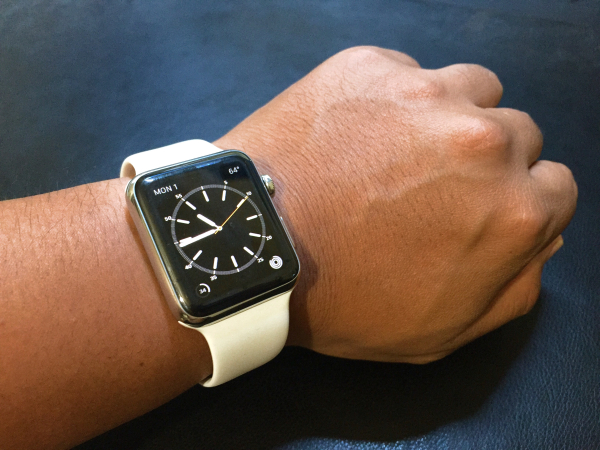
Apple Watch 42mm Stainless Steel

My First Month with Apple Watch

After two years of speculating and writing about it, the Apple Watch is finally here! It’s been over a month since I chased down my UPS guy for my missed package, and now I have enough personal experience to share my thoughts on it.

A Little Background

In the past few years, I’ve made a conscious effort to use my phone less. Specifically, to stop texting while driving, and stop fiddling with my phone when I’m out with friends. That means less documenting my life on social media and simply living more in the moment.

Did you know the average smartphone user checks their phone 150 times per day? That means two things:

  1. People waste time throughout the day just reaching into their pockets/bags, pulling out their phones, checking notifications, and then putting them back into their pockets/bags.

  2. People obsessively hold their phones in their hands (or at least keep within arms reach) at all times throughout the day.

Just look at Facebook and count how many photos include people holding their phones. People holding their phones at the dinner table. On the dance floor. While drinking with friends. At the swimming pool. Out camping. All because we’ve trained ourselves to disconnect from the moment just so we can stay “connected” to everyone else in the world over text and social media.

My First Smartwatch

Someone once said:

The desktop is meant to be used hours at a time. Phones for minutes at a time. Watches for seconds at a time.

That just made a ton of sense to me. I realized if I could just relieve my phone of push notification duties, all of a sudden I could drastically cut down my phone usage and just keep my phone in my pocket.

So last year, for my birthday, I went ahead and bought a Pebble smartwatch.

Why I Loved My Pebble Smartwatch

  • I could stay on top of notifications while shooting hoops in my backyard.
  • I could control the music on my phone speakers while showering.
  • I could read push notifications while stuck in traffic more easily.
  • When I woke up from a nap and couldn’t find my iPhone, I could hit the play button to make my phone play music.
  • When I walked my dog, I could control my music while keeping my phone in my pocket.

Dislikes About Pebble Smartwatch

  • It was ugly. As much as I loved the utility, I hated the way it looked, especially how it clashed with everything when I dressed up. It just screamed “computer nerd” to anyone who saw it.
  • While getting notifications on my wrist was extremely helpful, I still needed to grab my phone to act on those notifications.
  • It was fucking ugly.

Enter Apple Watch

Even before I got my Pebble, I knew the Apple Watch was coming. I knew it was going to look like a watch, not a fitness band, because of all the executives/creatives they were recruiting from the fashion industry. I knew it was going to offer tighter integration with the iPhone (and the entire Apple ecosystem), better than any other third-party smartwatch/fitness band will ever offer, because that’s just how Apple rolls.

For the first time ever, even before the product was announced, I knew I was going to get one.

I’ve always dreamed of having a Dick Tracy/Power Rangers watch as a kid. I’ve always loved the craftsmanship of timepieces ever since high school. I’ve always respected the simplicity and elegance of Apple’s industrial design since my first iPod.

And now, the Apple Watch is in my life. With over a month of hands-on time under my belt, here’s everything I learned:

Early Observations

  • It is NOT a smartphone. It’s a dashboard and remote for your phone. Once I realized that, it became easier to manage expectations.
  • It is not something you play with. It’s something you set and forget.
  • It takes weeks to find the right balance of notification settings.
  • It is best used in short bursts. Holding up my arm for longer than 5 seconds is not only uncomfortable, but really awkward in public.
  • Taptic feedback is nice step up from standard vibration. It literally feels like it’s tapping you. Plus, Apple did a brilliant job complimenting taps with the right sounds. An alert that sounds like a bell ringing also feels like a bell ringing on my wrist.
  • Battery life is much better than expected. I always have about 40% of battery to spare when I go to bed.
  • Switching watch straps has a profound affect on the personality of the watch. I already own two sport straps (black and white) and plan on ordering a custom leather strap for formal occasions.
  • I feel so naked without it now. There are those awkward moments in the morning when I look at my wrist to check weather and realize I haven’t put on my watch yet.
  • My first Apple Watch sighting in the wild: a woman in her mid-40s. As a nurse, she bought the watch for notifications and messaging while she works.
  • It’s showerproof! After watching videos of divers jumping off a high dive with their Apple Watches, I shower with my watch after working out with it.
  • Having an accurate health tracker with a screen that displays graphs is much more motivating than a small Fitbit screen that only displays numbers.
  • Battery life on my iPhone has improved noticeably since the screen no longer lights up for each incoming notification.

How I Use My Apple Watch

  • I use the Workout app to track my heart rate and physical activity while doing basketball drills. I don’t stop until I at least fill the Exercise Ring.
  • I’ve responded to texts using dictation while shooting hoops in the backyard. No more using my shirt to wipe dirt off my hands and touching my phone to respond. My watch gets a nice rinse when I shower anyway.
  • I’ve answered a quick phone call on my watch in the middle of giving my dog a bath. No rushing to dry my hands since it’s showerproof.
  • I thoroughly enjoy the freedom of walking around the house in my undies while my phone is charging. No pockets? No problem. Phone calls and iMessages get forwarded as long as I’m on the same WiFi network.
  • I check into Foursquare with just a couple swipes and a tap.
  • Every morning I get into my car, I start my podcast player, Overcast, from my watch.
  • I control my Apple TV with my watch. No more searching the couch cushions for the Apple Remote.
  • Because it’s power efficient and charges reasonably fast, I now sleep with my Apple Watch. When I wake up, I charge it for 20-30 minutes in bed while I catch up on social media and news feeds on my phone. By the time I’m done, I’ll have about 80% battery life, which has been plenty. At night I give it another 20-30 minutes of charging.
  • When I’m out with friends, I keep sound notifications on to make it clear to others that I’m checking my notifications, not bored of their company. When I’m at work, I put it on silent and rely on the haptic feedback.
  • Unlike a smartphone, I’ve found that the fewer apps, the better.
  • The best workflow I’ve found for managing notifications: have all phone notifications forward to the watch but only have time-sensitive ones tap your wrist. When a notification comes in, swipe down to dismiss it. Otherwise, use Notification Center on the watch to catch up on any you missed and Force Touch to Clear All.

Minor 1.0 Annoyances

  • 98% of third-party apps for Apple Watch suck…for now. But that’s understandable because no developers had an actual watch to test with. Now that developers have watches, they will move quickly to build apps that make sense on a wrist.
  • It’s hard to auto-activate the screen when lying down (so I’ve learned to touch the screen instead).
  • Back-swiping to go back a screen is very inconsistent across apps. On a screen this small, all apps should embrace gestures more instead of fully relying on tiny-ass buttons.
  • Am I using a Glance or an app? Sometimes I think I’m using a Glance and swipe down to close it, but it’s actually an app and swiping down does nothing.
  • When my phone is outside of Bluetooth range but still on WiFi range, I can still still receive iMessages and phone calls on my watch. Unfortunately, no other notifications relay the same way.
  • While receiving heartbeats via Digital Touch are in real-time, receiving taps are not.
  • I occasionally find myself swiping down to access Notification Center, but that gesture only works in Watchface mode.
  • The side button really should be customizable. Right now it is used to open the Friends app, but for such a personal device, each person should be able to assign it to their most-used app.

The good news is, all of these annoyances can be fixed over time with software updates. Remember, once upon a time, the first iPhone didn’t support picture messages or even copy/paste.

Now that I have my observations out of the way, here are the most typical reactions I hear:

“I don’t want all my notifications on my wrist! I’ll be even more distracted!”

Some notifications are worthy tapping your wrist for your immediate attention (i.e. phone calls and emails from your boss). Other notifications definitely aren’t. There are plenty of notification settings to help you prioritize the important ones.

The great thing about having notifications on your wrist is it’s much more convenient to glance at than reaching into your pocket, checking your phone, and putting it back into your pocket.

Remember, the average person checks their phone 150 times per day. Seconds add up.

“Android’s had that for years!”

Smartwatches in general have been around for over a decade. The problem is, each and every one of them have been too clunky and/or too geeky to get any sort of mass market appeal.

All but one Android Wear device measure in at 46mm (with the lone exception being 42mm). Apple Watch comes in 38mm and 42mm and include a wide range of meticulously-crafted official straps that even luxury watch enthusiasts are applauding.

Good luck convincing millions of non-techie men and women that a one-size-fits-all 46mm chunk of metal is fashionable.

In the real world, when it comes to smartwatches, looks matter more than specs and features. Just look at #AndroidWear vs. #AppleWatch on Instagram and compare the demographics of each platform.

“It’s going to be obsolete in two years.”

A totally valid concern. The general assumption is the Apple Watch will be updated every year and redesigned every two years, just like the iPhone. But that is only an assumption.

Another possibility is the Apple Watch will be updated more like the MacBooks. Every year, the internals are updated but the actual device gets a full redesign every 3-5 years.

We’ll just have to wait and see.

“Should I get one?”

Depends.

If you are a techie, Apple enthusiast, mobile app developer, or early adopter with the disposable cash, definitely get one! I’d recommend the low-end Sport editions, just in case Apple launches a much better v2.0 next year and you’ll want to upgrade immediately.

To everyone else, I will give a more conservative answer — hold off for now. Wait until a really great watch app emerges from the App Store. There is no rush. The iPhone didn’t become a mainstream success until the iPhone 4.

If the Apple Watch is something that you have to save up for, save for v2.0. Historically, 2.0 Apple devices have been huge upgrades over the original models.

(If Christmas comes around and your girlfriend already has an iPhone and iPad, then sure, get a pair of Apple Watches for yourselves.)

As for me, I am one happy customer. This is a nice upgrade over my old Fitbit, a huge feature upgrade over my Pebble smartwatch, and I get an early glimpse of Apple’s vision of the future. Every time a big company launches a watch app, or a big chain adds support for Apple Pay, or a home appliance company adds support for Apple HomeKit, the Apple Watch becomes more valuable.

Consider this:

Back in 2008, when the iTunes App Store first launched, nobody had any idea we’d end up with phenomenons like Instagram, Snapchat, and Uber. What killer apps will the Apple Watch bring in 5 years?

I can’t wait to find out.

In the meantime, I’m enjoying putting my phone down, focusing more on the world around me, and living more in the moment with my dog, my family, and my friends.

Apple Watch 1.0 →

Mark D. Mill:

Can Apple Watch do everything now? No. Can it replace your phone? No. Is it bug-free? No. Is there room for improvement? Yes. Are any of those expectations appropriate for the first generation of any product? Of course not. Apple Watch is not a perfect product, but many people are forgetting that neither was the first iPod, the first iPhone, or the first iPad. Rather than evaluating whether the product is already mature, a better question is to ask whether Apple has laid a foundation on which Apple Watch can grow. The answer, I believe, is a resounding yes.

Apple Adopts Progressive Enhancement for iOS 9 →

9to5mac:

In order to avoid the sluggishness and bugginess that was most notably seen in iOS 7 for the iPhone 4, Apple has restructured its software engineering process to better support older hardware.

Instead of developing a feature-complete version of iOS 9 for older hardware and then removing a handful of features that do not perform well during testing, Apple is now building a core version of iOS 9 that runs efficiently on older A5 devices, then enabling each properly performing feature one-by-one. Thanks to this new approach, an entire generation (or two) of iPhones, iPads, and iPod touches will be iOS 9-compatible rather than reaching the end of the iOS line.

Great news. In addition to better performance on older devices:

  • slow iPhone/iPad upgraders will be able to run the latest versions of third-party apps
  • older iPhone/iPad users will get the latest security updates
  • app developers can spend less time/resources on supporting older iOS versions
  • third-party apps will progress faster

Kids React to Apple Watch →

This perfectly encapsulates the entire range of first impressions that the Apple Watch is getting.

By far the most common complaint was how the Apple Watch requires an iPhone. Totally valid complaint. But once upon a time, the iPod needed a Mac. And eventually it grew into the iPhone.

Also, kudos to the kids who understand we don't need smartwatches, the same way we don't need a smartphone or a TV; we just want it the luxury because it delights us and makes our lives easier.

Apple Watch's Other Underrated Feature →

Out of all the Apple Watch reviews that came out today, only one person brought this up. Ben Bajarin:

Primarily around the notification and glance-able data experience, I saw a behavioral shift in how I used my iPhone. In many ways the Apple Watch untethered me from my iPhone the way the iPhone untethered me from my PC. I was free to leave my phone somewhere in the house, at my desk, or in my pocket, and focus more on the moments of real life. Sometimes it was a meeting, at home, out in my yard, at the kid’s tennis match, etc. There was peace of mind knowing I can leave my phone out of sight or mind but still have access to the relevant information or notifications and even be able to interact and respond to them. The most important interactions and information are no longer only accessible on my large screen smartphone. This experience, of moving key functionality from my iPhone to my wrist, proved to add a significant amount of value to my overall day.

Smartphones are known as digital leashes. Our phones are always within an arm's reach, constantly begging us to pick up, play with, and distract us from the things that matter. All of the other reviews talked about the Apple Watch giving you less reason to reach into your pocket for your phone but Ben Bajarin is the only person to talk about how much more freedom you'll have at home with your family, just by leaving your phone at his desk.

Cooking dinner for the family. Spending quality time with your kids. Having playtime with your dog. Gardening in the front yard. Shooting hoops in the backyard. Working out in the garage.

When you're at home, you should feel at home; you shouldn't have to feel obligated to stay leashed to the world through your phone. With a smartwatch, as long as you set up the your notifications right, you'll be given back some more of your time, as well as your freedom, to enjoy the things that actually matter.

Apple Critics on the iPhone Announcement in 2007 →

In anticipation of the first-gen Apple Watch being released later this month, here are some comments on the original iPhone back in 2007:

the iphone is announced to appear in 2007 , the n95 from nokia which is a 2006 model cand kick iphone's arse very easily, the iphone is just some sort of eye candy, i have a 6680 and i would'n trade it for iphone:)
try comparing the iphone with the n95 on gsm arena, you will be surprised.

Apparently none of you guys realize how bad of an idea a touch-screen is on a phone. I foresee some pretty obvious and pretty major problems here.
I'll be keeping my Samsung A707, thanks. It's smaller, it's got a protected screen, and it's got proper buttons. And it's got all the same features otherwise. (Oh, but it doesn't run a bloatware OS that was never designed for a phone.)
Color me massively disappointed.

Im not impressed with the iPhone. As a PDA user and a Windows Mobile user, this thing has nothing on my phone. It sure is good at what it was designed for, a phone that entertains and talks... other than that, i dont see much potential. How the hell am I suppose to put appointments on the phone with no stylus or keyboard?! I can sync it with my computer, but when Im on the go, I cant do either!
No thanks Apple. Make a real PDA please....

lol last i checked many companies tried the tap to type and tap to dial ... IT DOESNT WORK STEVIE, people dont like non-tactile typing, its a simple fact, this isnt a phone its a mac pda wow yippie....
I mean it looks pretty but its not something i forsee being the next ipod for the phone industry...
and its funny how people are "orgasming" when you havent even seen it being used or a real presentation of it just a mockup graphic on the screen, yes its thinner than the q and the samsung, guess what those were 2006 phones, this is a 2007 apple phone, what did samsung and motorola stop developing last month or something?
It took apple how long to develop this ONE PHONE, samsung and motorola release new phones every few months lol, and constantly innovates and gets better, im sorry but if im sending text messages i'd rather have my thumb keyboard than some weird finger tapping on a screen crap.

Typical short-sighted reactions by consumers who are driven by tech specs, feature lists, "but other companies did it first," and think design is about "how it looks."

The Apple Store Advantage →

Matt Richman:

The challenge of selling Apple Watch illustrates their foundational nature. Apple Watch is technology combined with jewelry, a product that must be experienced to be fully understood.

Jewelers, however, are unequipped to sell technology, and technology retailers are unequipped to sell jewelry. But because Apple has its own stores, the company can redesign them to sell a product that’s a combination of both.

Without Apple Stores, there would be no place to properly experience the Watch, so it would have a far smaller chance of success. Apple Stores are a crucial foundation for Apple Watch — and Apple’s competitors have nothing truly comparable.